Endpoints Observability
Middleware Endpoint Monitoring discovers API endpoints from applications and gives performance metrics data such as request volume, latency, and errors for each endpoint.
Use it to monitor request volume, latency, and errors for individual endpoints and drill down into the traces, spans, dependencies, and deployments behind an endpoint.
A linked OpenAPI (Swagger) specification adds API contract details, including descriptions, parameters, and response definitions. These documented expectations appear alongside observed runtime behavior.
View Endpoints#
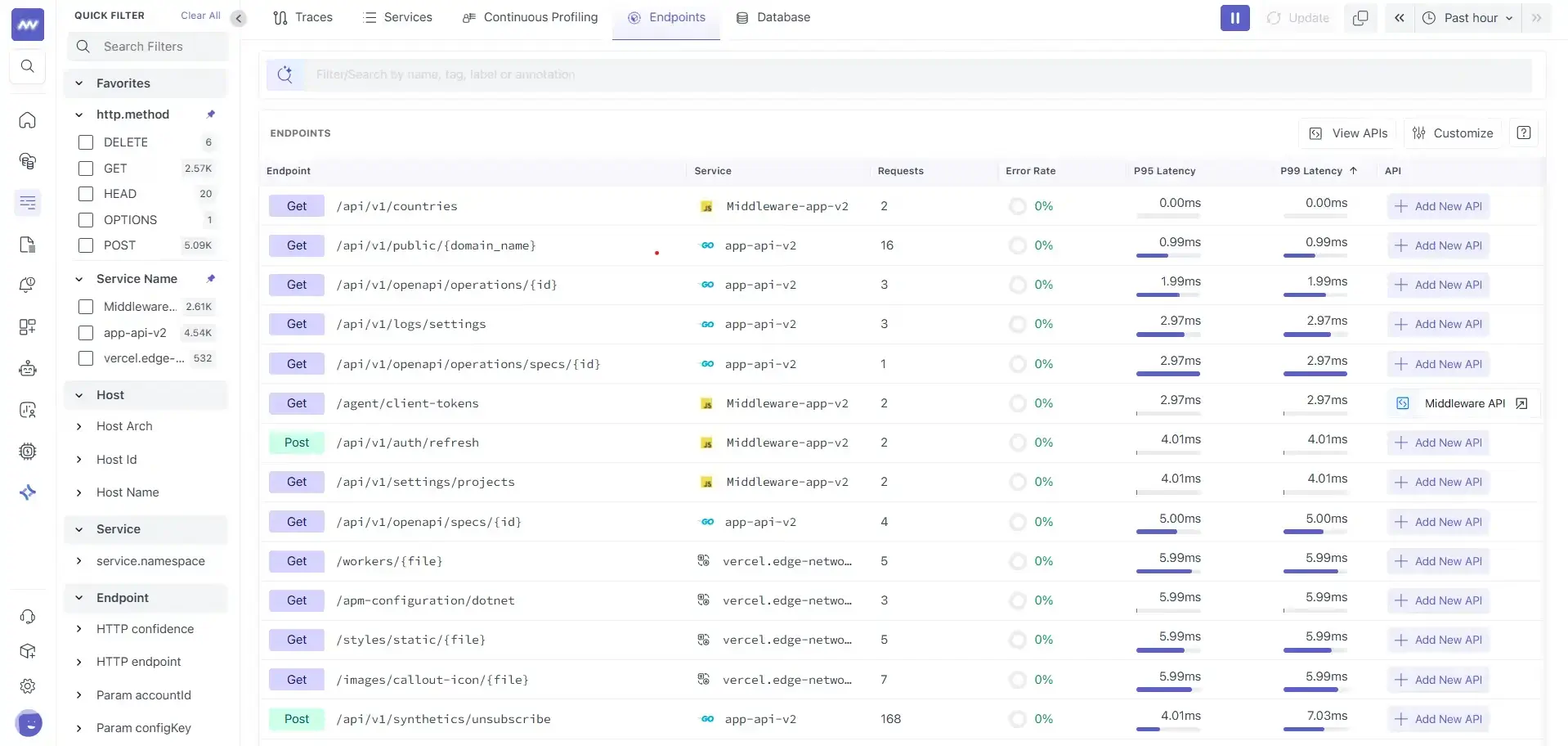
Go to APM → Endpoint Monitoring to view endpoints discovered from your application's trace traffic.
The endpoint list provides:
- Endpoint: HTTP method and route.
- Service: Service handling the endpoint.
- Requests: Request volume for the selected time range.
- Error rate: Percentage of failed requests.
- P95 / P99 latency: Tail latency calculated from observed requests.
- API: Indicates whether the endpoint is linked to an OpenAPI specification.
Use these metrics to identify endpoints with increased traffic, latency, or errors and select an endpoint for further investigation.
Endpoint Details#
Select an endpoint to open its detail panel.
The panel combines runtime telemetry collected from traces with API contract information when an OpenAPI specification is linked.
Endpoint details are organized into four main areas:
- Info
- Deployment & Dependencies
- Traces & Spans
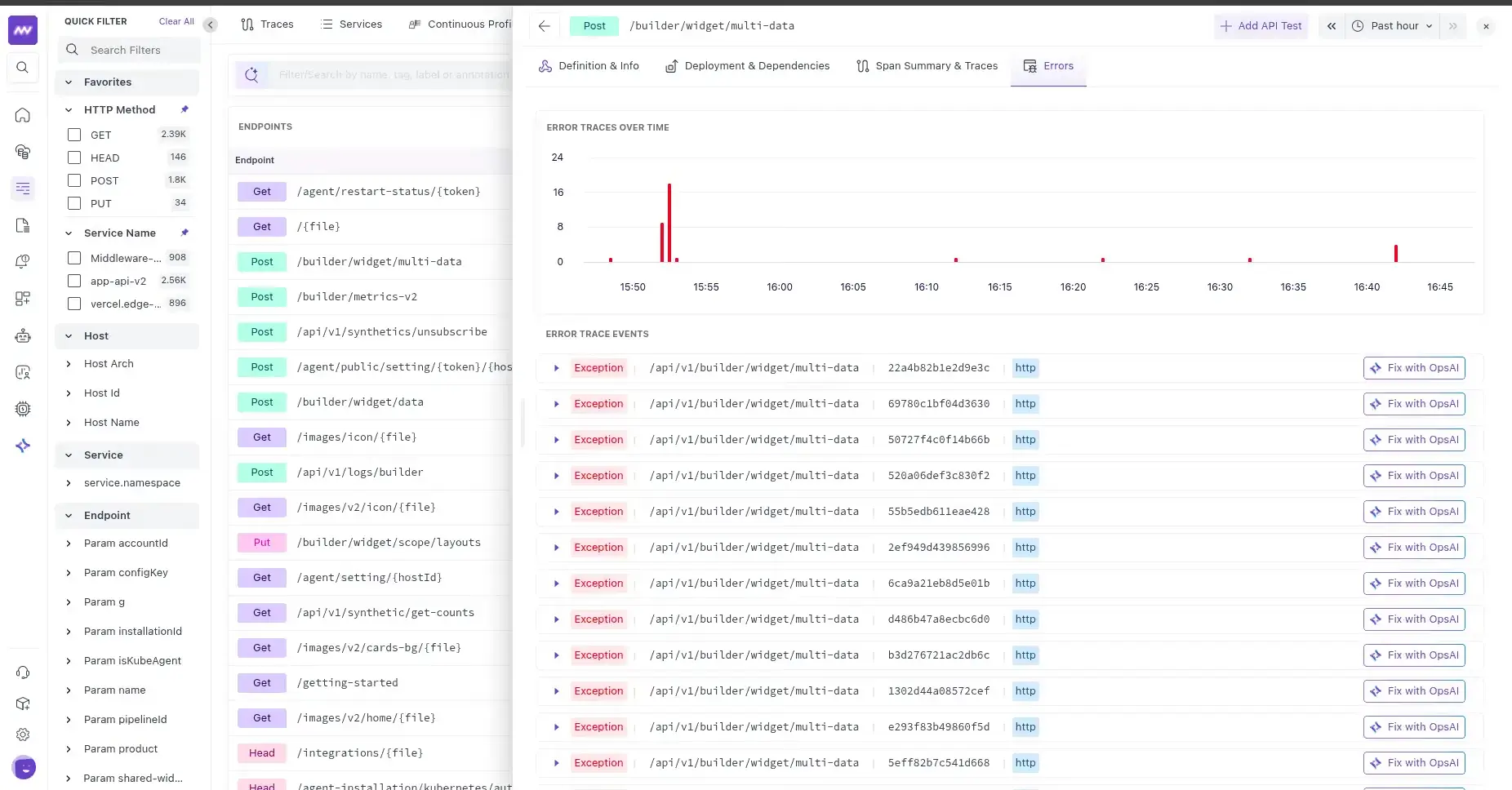
- Errors
The header displays the endpoint method and route along with actions such as Add API Test and time-range controls.
Info#
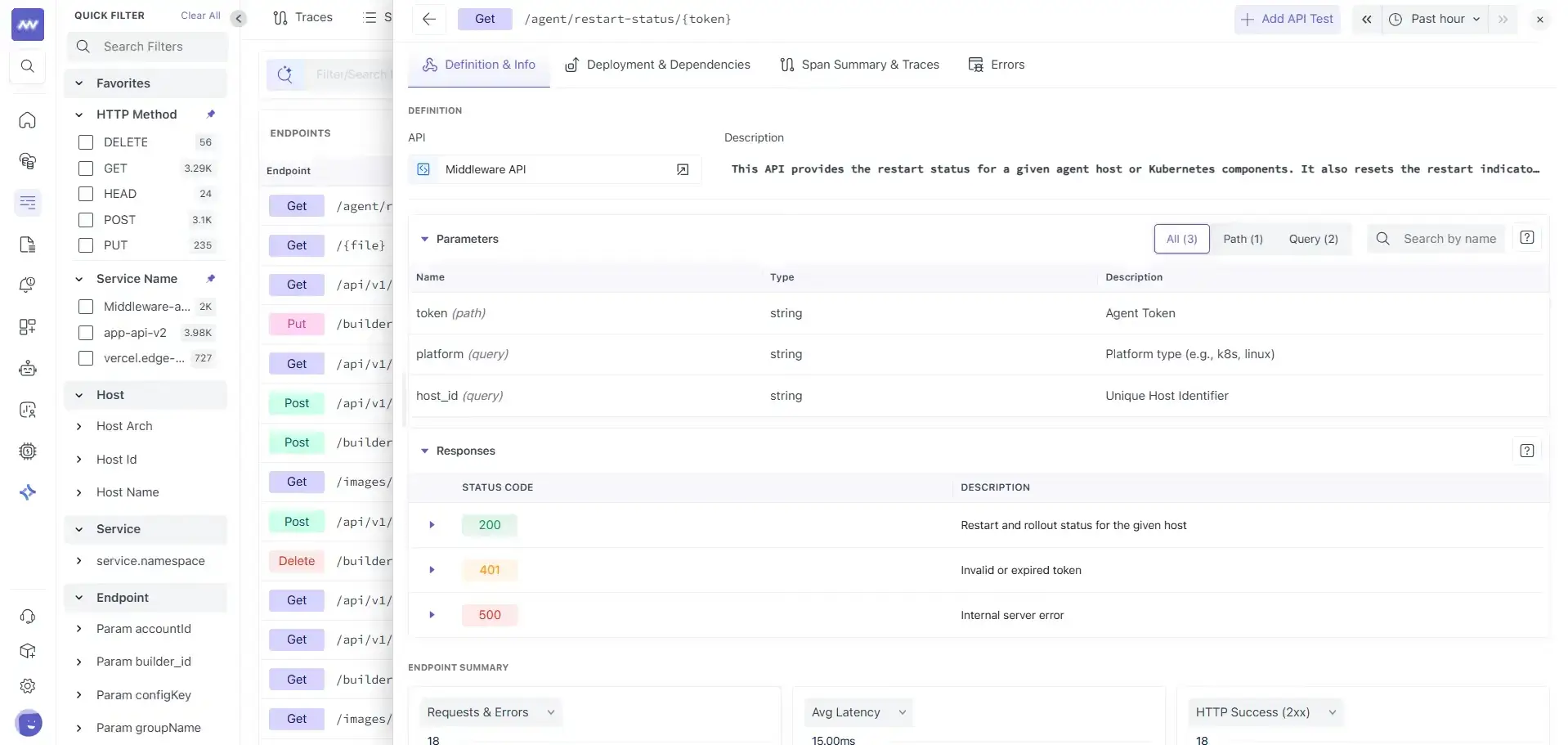
The Info tab displays endpoint information and, when available, contract details from the linked OpenAPI specification.
You can use this tab to:
- See which API specification is linked to the endpoint.
- View the endpoint description.
- Inspect request parameters.
- Review documented response codes.
Parameters#
Parameters defined in the OpenAPI specification are displayed with information such as:
- Name
- Location
- Data type
- Description
You can filter parameters by:
- All
- Path
- Query
- Body
You can also search for a parameter by name.
Responses#
The Responses section displays HTTP response codes documented for the endpoint, such as 200, 401, or 500, along with their descriptions from the OpenAPI specification.
The specification describes the API contract; trace data shows observed requests. Together, they provide context for comparing expected inputs and responses with application behavior.
Deployment & Dependencies#
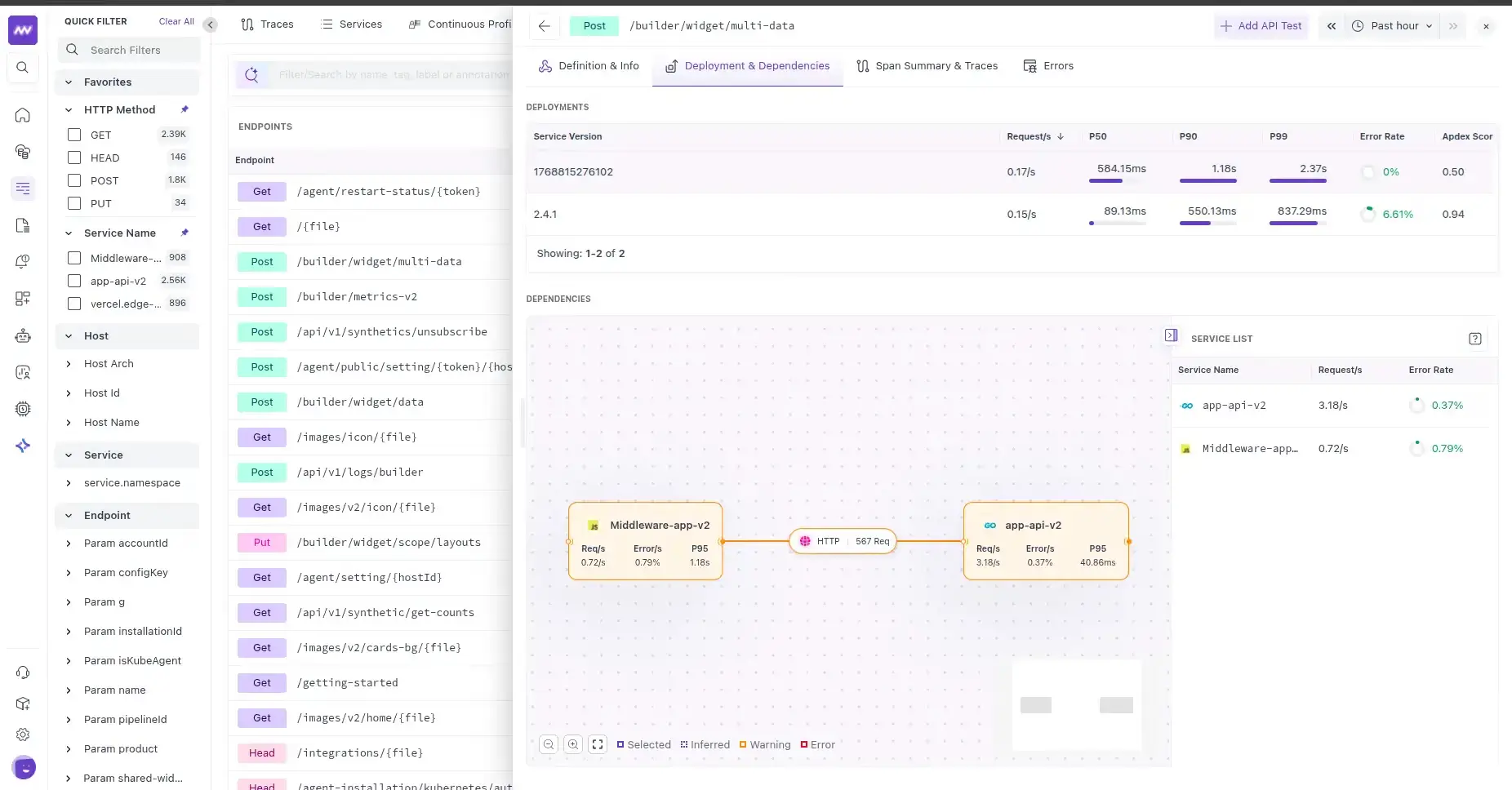
Use Deployment & Dependencies to understand how endpoint performance changes across service versions and which downstream components it depends on.
Deployments#
The Deployments section breaks down endpoint performance by service version.
For each version, you can review metrics including:
- Requests per second
- P50 latency
- P90 latency
- P99 latency
- Error rate
- Apdex score
Use this view to compare endpoint behavior across deployments. For example, if latency increases after a new service version is deployed, you can compare its latency and error metrics with previous versions.
Dependencies#
The Dependencies section displays downstream dependencies associated with the endpoint when dependency data is available.
Use the dependency map to understand which services or components participate in requests to the endpoint and identify dependencies that may contribute to latency or errors.
If no dependency information is available for the selected time range, the section displays No data found.
Traces & Spans#
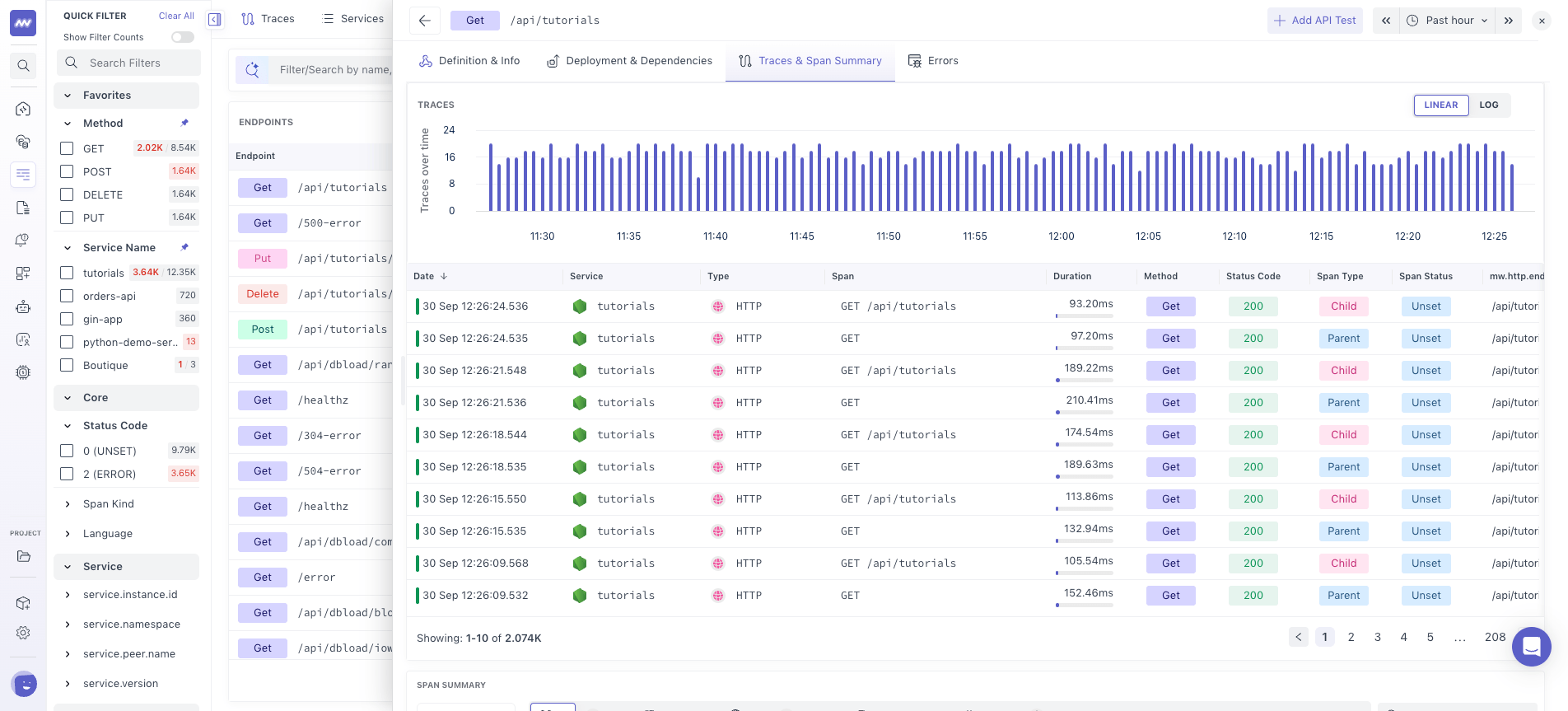
The Traces & Spans tab shows the runtime operations behind requests to the selected endpoint.
Span Summary#
The Span Summary groups operations by span type, such as:
- HTTP
- PostgreSQL
- Internal
- Function
- Job
- Other
For each span, you can see:
- Service name
- Span name
- Span type
- Average duration
- Error rate
Use the Span Summary to identify where request time is being spent. For example, you can determine whether endpoint latency is primarily associated with database calls, downstream HTTP requests, or internal application processing.
Traces#
Below the Span Summary, you can inspect traces associated with the endpoint.
The trace section includes:
- Trace volume over time
- Linear or logarithmic graph scale
- Timestamp
- Duration
- HTTP method
- Status code
- Span kind
Select a trace to continue the investigation in Trace Explorer and inspect its complete request flow.
Errors#
The Errors tab focuses on failures associated with the selected endpoint.
Use this view after identifying an endpoint with an increased error rate to inspect the errors occurring for that endpoint and narrow down the source of the failure.
This provides a direct path from an endpoint-level error signal to the application errors associated with affected requests.
Link Endpoints to an OpenAPI Specification#
Middleware can associate discovered endpoints with an OpenAPI specification to add API contract information alongside runtime telemetry.
You can provide an OpenAPI specification by:
- Connecting to GitHub.
- Uploading an OpenAPI file in JSON or YAML format.
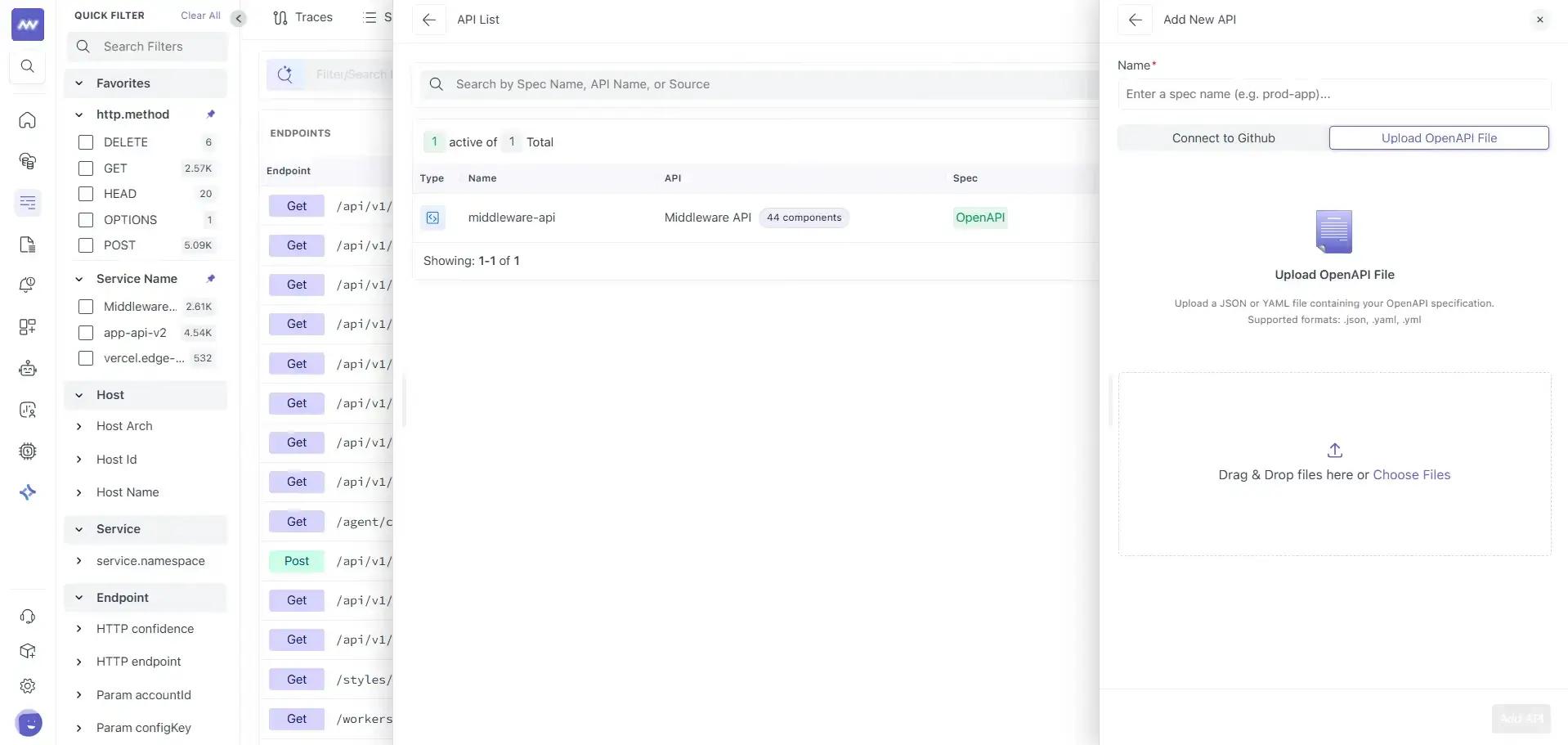
Add an API#
- Go to APM → Endpoint Monitoring.
- Select View APIs.
- From the API List, select Add New API.
- Enter a name for the API.
- Choose Connect to GitHub or Upload OpenAPI File.
- Select or upload your OpenAPI specification.
View and Manage APIs#
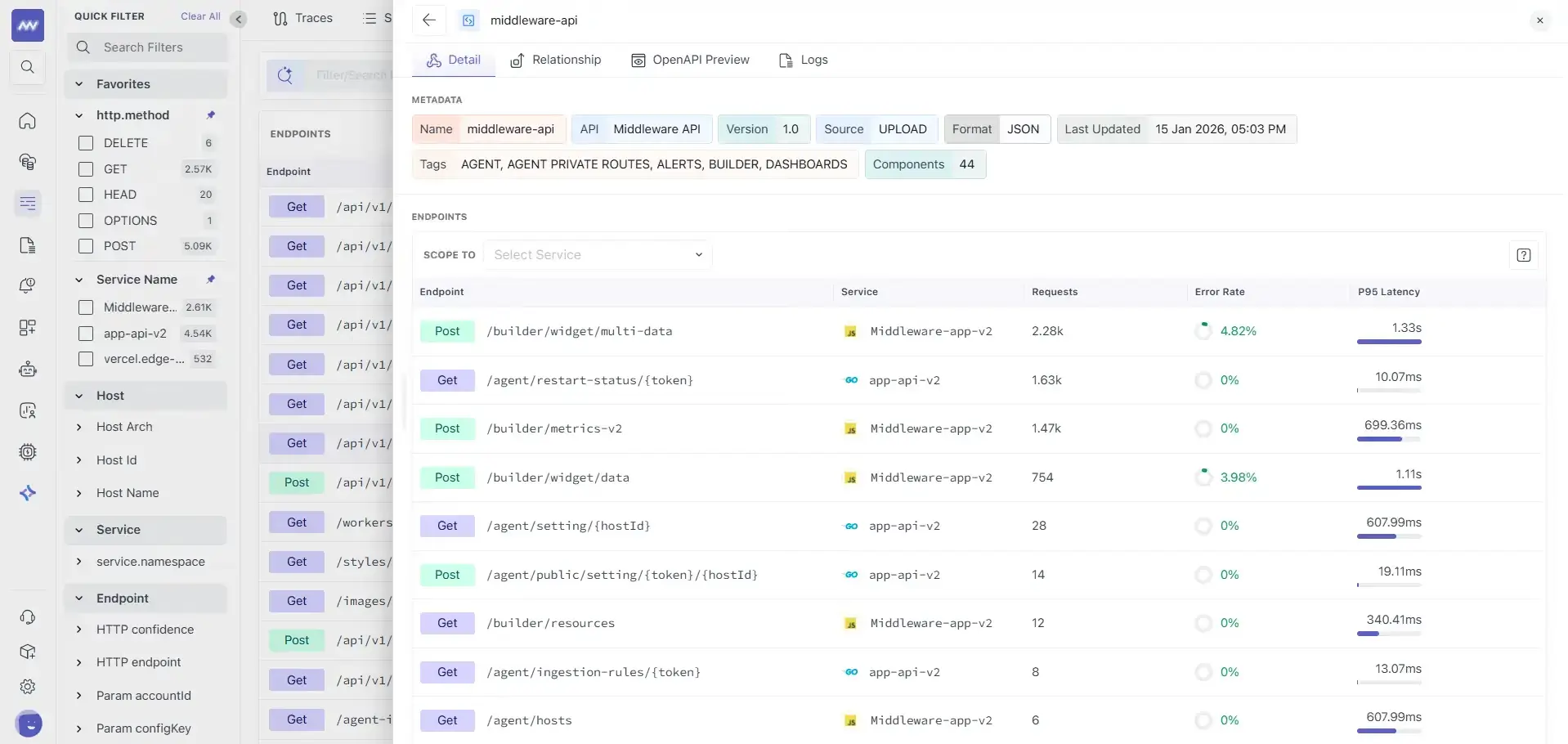
Uploaded or connected specifications appear in the API List.
For each API, you can view information such as:
- Specification name
- API group
- Components count
- Specification type
- Source
- Schema version
Select an API to open its details.
The API details page includes:
- Name
- Version
- Source
- Format
- Last updated
- Tags
- Components count
- Endpoints associated with the API
For linked endpoints, you can also view runtime signals such as traffic and latency alongside their API definitions.
Investigation Workflow#
A typical endpoint investigation can follow this sequence:
- Go to APM → Endpoint Monitoring and identify an endpoint with increased latency or errors.
- Open the endpoint and review its overall performance.
- Check Deployment & Dependencies to determine whether the behavior is associated with a particular service version or downstream dependency.
- Open Traces & Spans to identify which operations contribute most to request duration or errors.
- Select a relevant trace to inspect the complete request flow in Trace Explorer.
- If the endpoint is failing, use the Errors tab to inspect associated errors.
- When an OpenAPI specification is linked, use Info to review the expected parameters and response definitions alongside the observed runtime behavior.
Need assistance or want to learn more about Middleware? Get in touch with us via our Contact Us or join our Slack channel.
What did you think of this content?