Zenduty Integration
Connect Middleware alerts to your Zenduty services so incidents route to the right on-call teams with your existing escalation policies and schedules.
What you get#
- Send alert notifications from Middleware to Zenduty Services
- Auto-resolve incidents in Zenduty when alerts recover (requires "Notify on Resolve" enabled on the alert rule)
- Respect your escalation policies & on-call schedules configured in Zenduty
- Choose Zenduty as a notification medium per alert rule
Prerequisites#
- A Middleware workspace with permission to install integrations and create alerts
- A Zenduty account with permission to create Teams, Services, and Integrations
Step-by-step Setup#
1 Create a Generic Integration in Zenduty#
- In Zenduty, navigate to Teams and select the team you want to receive alerts.
- Open the Services tab and select (or create) a Service.
- Go to the Service's Integrations tab and click Add Integration.
- Search for and select Generic Integration (API).
- Click Configure on the newly added integration and copy the Generic Integration URL.
The URL follows this format:
1https://events.zenduty.com/integration/{team_id}/generic/{integration_key}/Note: Each Service can have its own Generic Integration. If you want different alert rules to page different teams, create a separate Service and Generic Integration for each.
2 Install Zenduty in Middleware#
- In Middleware, go to Integrations, search "Zenduty", and open it.
- Enter a Service Name (a label to identify this service in Middleware, e.g., "Production Alerts").
- Paste the Generic Integration URL you copied from Zenduty.
- Click Add Service.
A successful install shows the service listed with a masked URL preview. You can add multiple Zenduty services to route different alerts to different teams.
Use Test Connection to verify the URL is valid and reachable.
3 Use Zenduty when Creating an Alert#
- Create (or edit) an alert in Alerts → Create Alert.
- In Configure Notifications, select Zenduty as a medium.
- Pick the Service you want to page (e.g., "Production Alerts").
- Save the alert.
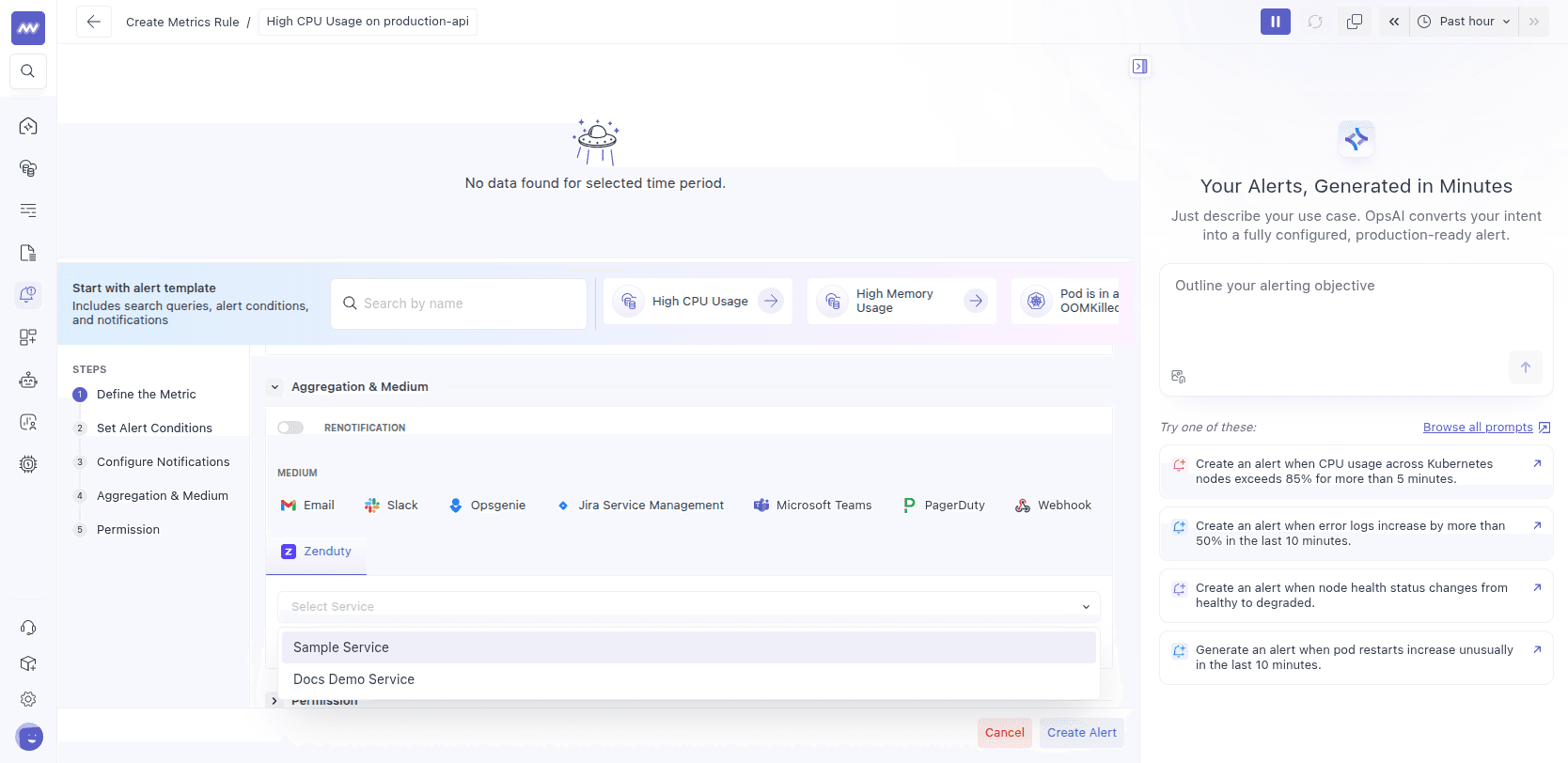
Tip: Enable "notify on resolve" if you also want a resolution update sent to Zenduty when the alert recovers. Zenduty will automatically resolve the corresponding incident.
How It Works#
When an alert triggers, Middleware sends an incident event to the Zenduty Generic Integration endpoint:
- Incident title: A short summary like "CRITICAL: High CPU Usage"
- Incident body: Structured details including the metric name, current value, condition, and a link to the alert in Middleware
- Dedup key: A stable identifier per alert rule and group value, so re-triggers update the same incident instead of creating duplicates
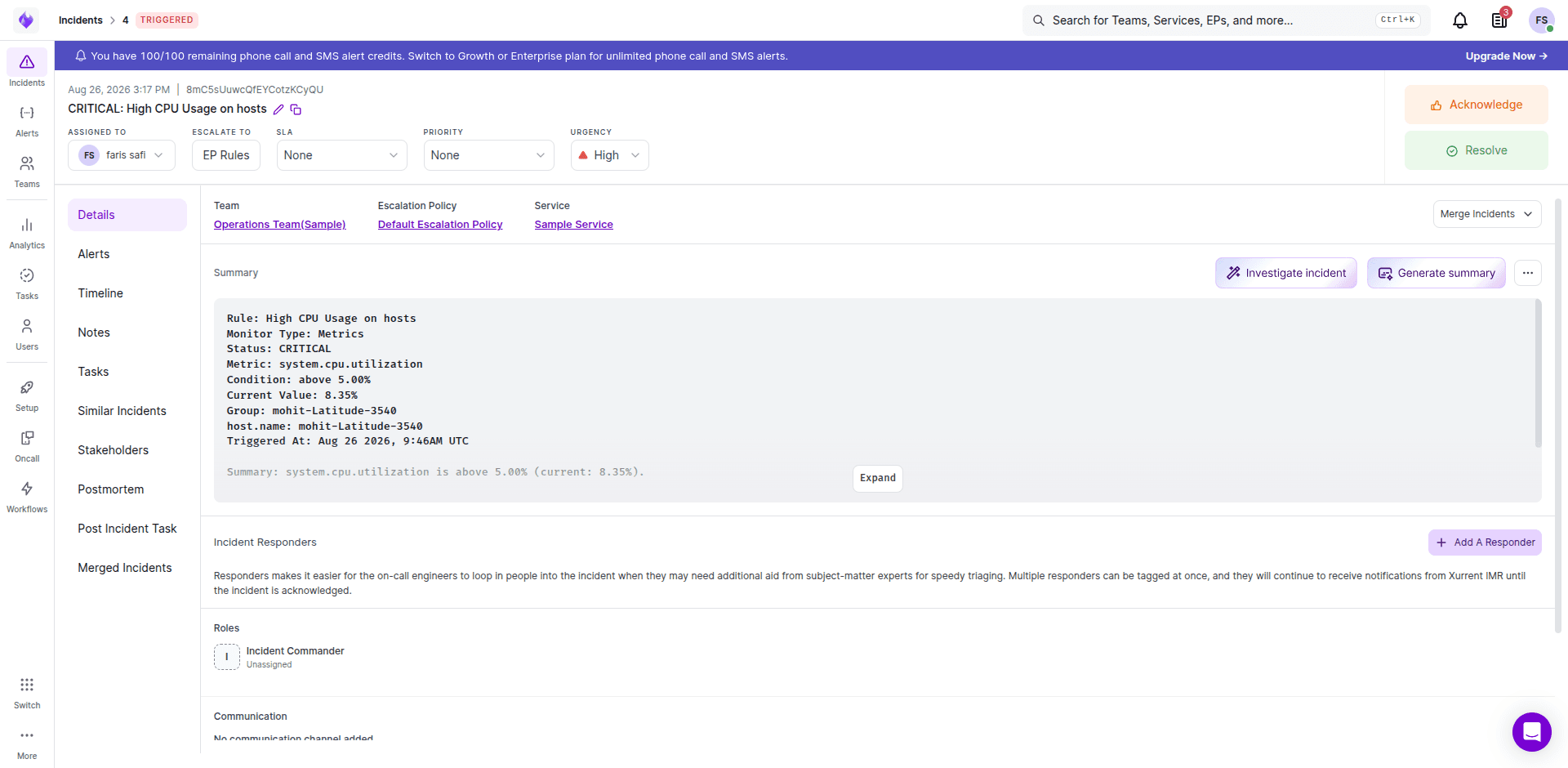
When "Notify on Resolve" is enabled on the alert rule and the alert condition recovers, Middleware sends a resolve event with the same dedup key, which automatically resolves the incident in Zenduty.
Verify the Integration#
- Trigger a test alert condition that targets a rule where Zenduty is selected.
- In Zenduty, check Incidents under the chosen Service and confirm the incident appears with your alert's title and details.
- If "Notify on Resolve" is enabled, confirm the incident is automatically resolved when the alert recovers.
Troubleshooting#
- Invalid URL on install: The URL must be a Generic Integration URL in the format
https://events.zenduty.com/integration/.../generic/.../. The legacy Zenduty/api/events/endpoint is not supported. - Test connection fails with 404: The integration key may be invalid or the integration was deleted in Zenduty. Re-create the Generic Integration and use the new URL.
- No services listed: No services have been added yet in Middleware. Follow the setup steps above to add at least one.
- Alert didn't trigger in Zenduty: Edit the alert rule and confirm Zenduty is selected as a notification medium and the correct Service is chosen.
- Was working, now failing: The Generic Integration may have been deleted or disabled in Zenduty. Check the integration status in Zenduty and re-add if needed.
Need assistance or want to learn more about Middleware? Get in touch with us via our Contact Us or join our Slack channel.
What did you think of this content?