API Testing
Middleware Synthetic Monitoring sends scheduled requests to test application, API, and network-service availability from selected locations. Tests validate responses against the conditions you configure.
Use synthetic tests to detect unavailable endpoints, slow responses, unexpected status codes, certificate problems, and network failures, including during periods with no real user traffic.
Middleware supports synthetic checks across multiple protocols, including:
- HTTP
- SSL
- DNS
- WebSocket
- TCP
- UDP
- ICMP
- gRPC
Synthetic tests run independently of real user traffic, allowing you to monitor an endpoint even when no users are actively accessing it.
API Tests#
API tests send requests to an endpoint on a configured schedule and validate the response against defined assertions.
For example, you can continuously verify that:
Status code = 200 AND Response time < 500 ms
If the response does not satisfy the configured assertions, the test run fails and can trigger configured notifications.
Create an API Test#
Go to: Synthetic Monitoring → Add New Test → API Test
Creating an API test involves:
- Choosing the request type.
- Configuring the request.
- Defining assertions.
- Selecting test locations.
- Setting the test frequency.
- Configuring notifications.
1 Choose a Request Type#
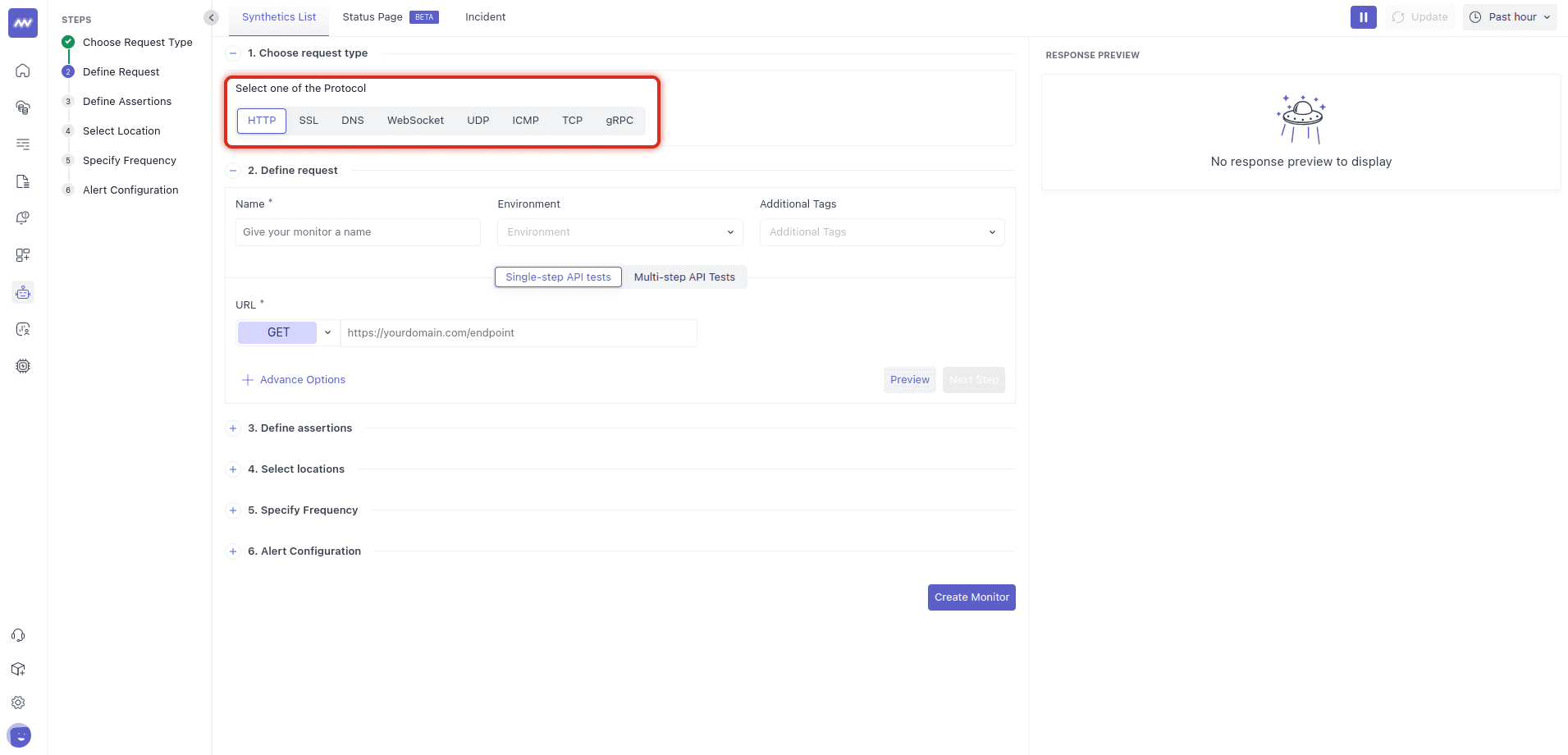
Select the protocol based on what you want to monitor.
| Protocol | Use it to |
|---|---|
| HTTP | Test web or API endpoints and validate response status, latency, and content. |
| SSL | Check SSL/TLS certificate validity and expiration. |
| DNS | Verify DNS resolution and response behavior. |
| WebSocket | Open a WebSocket connection and exchange messages. |
| TCP | Check TCP connectivity and latency. |
| UDP | Test UDP-based network connectivity. |
| ICMP | Check network reachability, latency, and packet behavior. |
| gRPC | Call gRPC endpoints and monitor response latency and errors. |
If no protocol is specified, the test defaults to HTTP.
For an API availability check, start with the minimum conditions required to confirm that the endpoint is working, such as a successful HTTP response and an acceptable response time.
2 Define the Request#
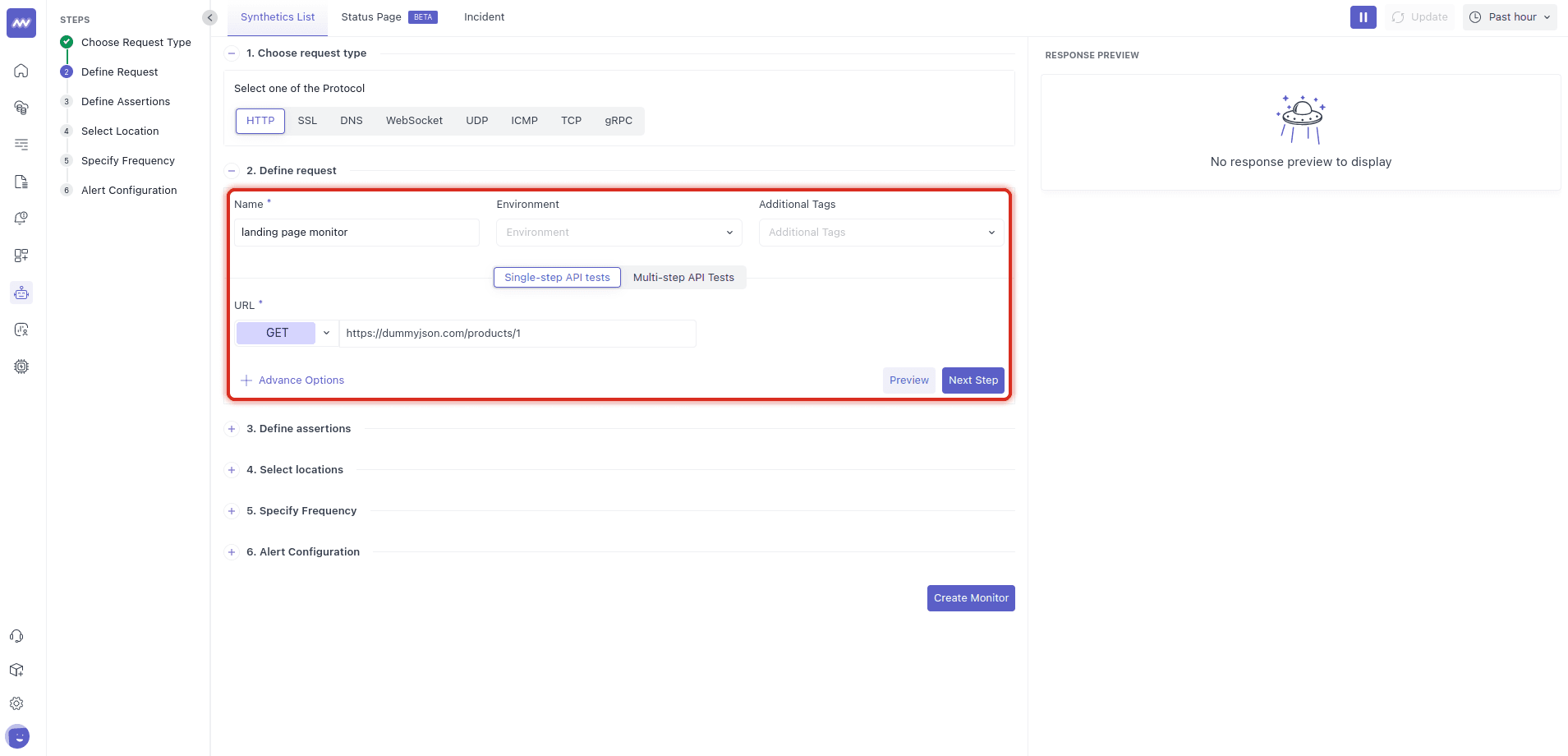
Provide the basic information for the test.
Name: Enter a name that makes the monitored endpoint easy to identify. For example: Checkout API
Environment: Select the environment where the endpoint is running, such as: prod, stage
Tags: Add tags to organize and identify tests. For example: team:payments
Test Type: Select Single-step API Test.
Multi-step and Browser tests use separate test flows.
HTTP Method and URL#
For HTTP tests, select the required method, such as:
- GET
- POST
- PUT
- PATCH
- DELETE Then enter the endpoint URL you want to monitor.
Where possible, configure the test to match the endpoint and request structure your application's real clients use.
3 Define Assertions#
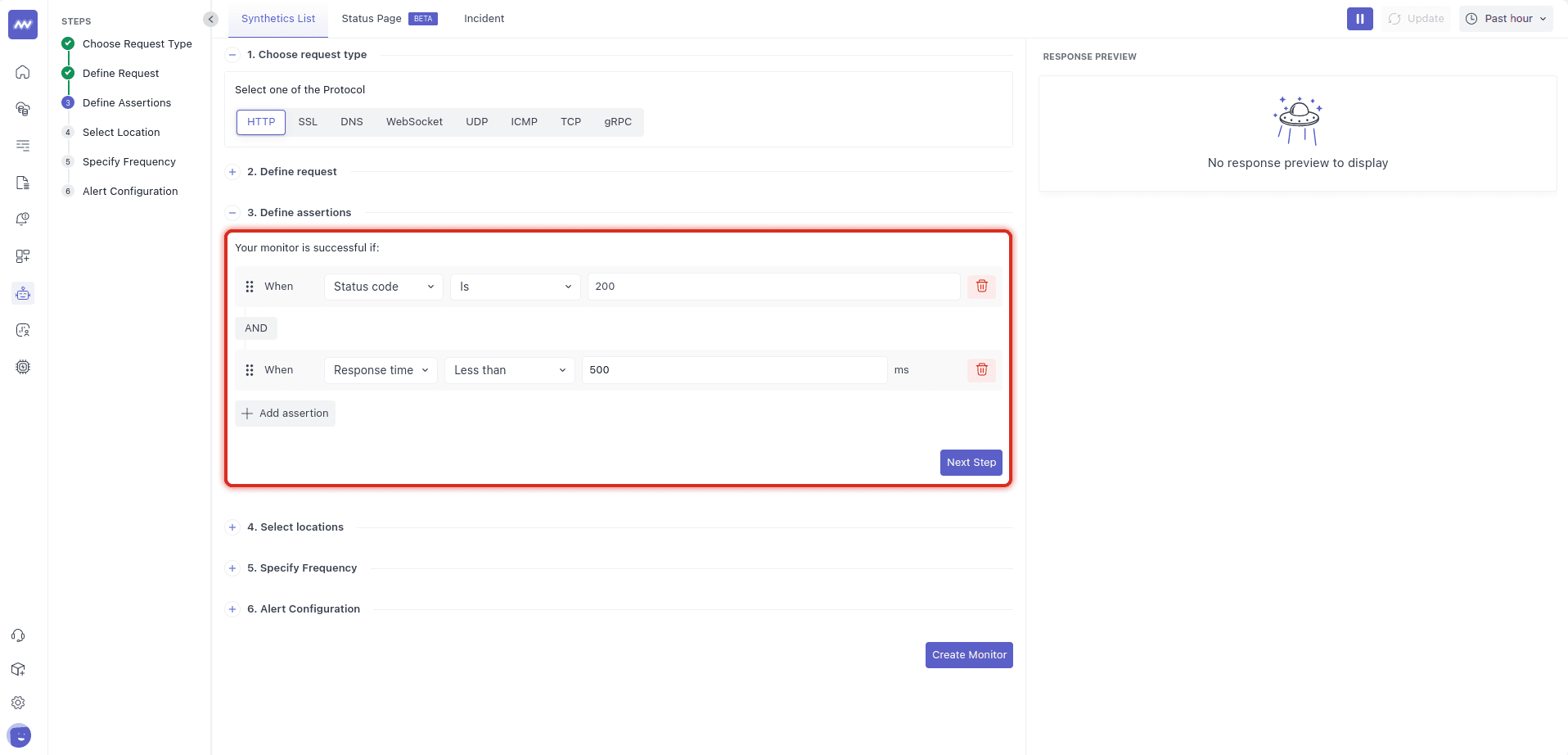
Assertions define the conditions a test must satisfy to pass.
You can add multiple assertions to validate different parts of the response.
For example: Status code = 200 AND Response time < 500 ms
Assertions can verify conditions such as response status and response time.
When multiple assertions are configured, the response must satisfy the configured conditions for the test run to pass.
Choose assertion thresholds based on the endpoint's expected behavior and performance requirements.
4 Select Test Locations#
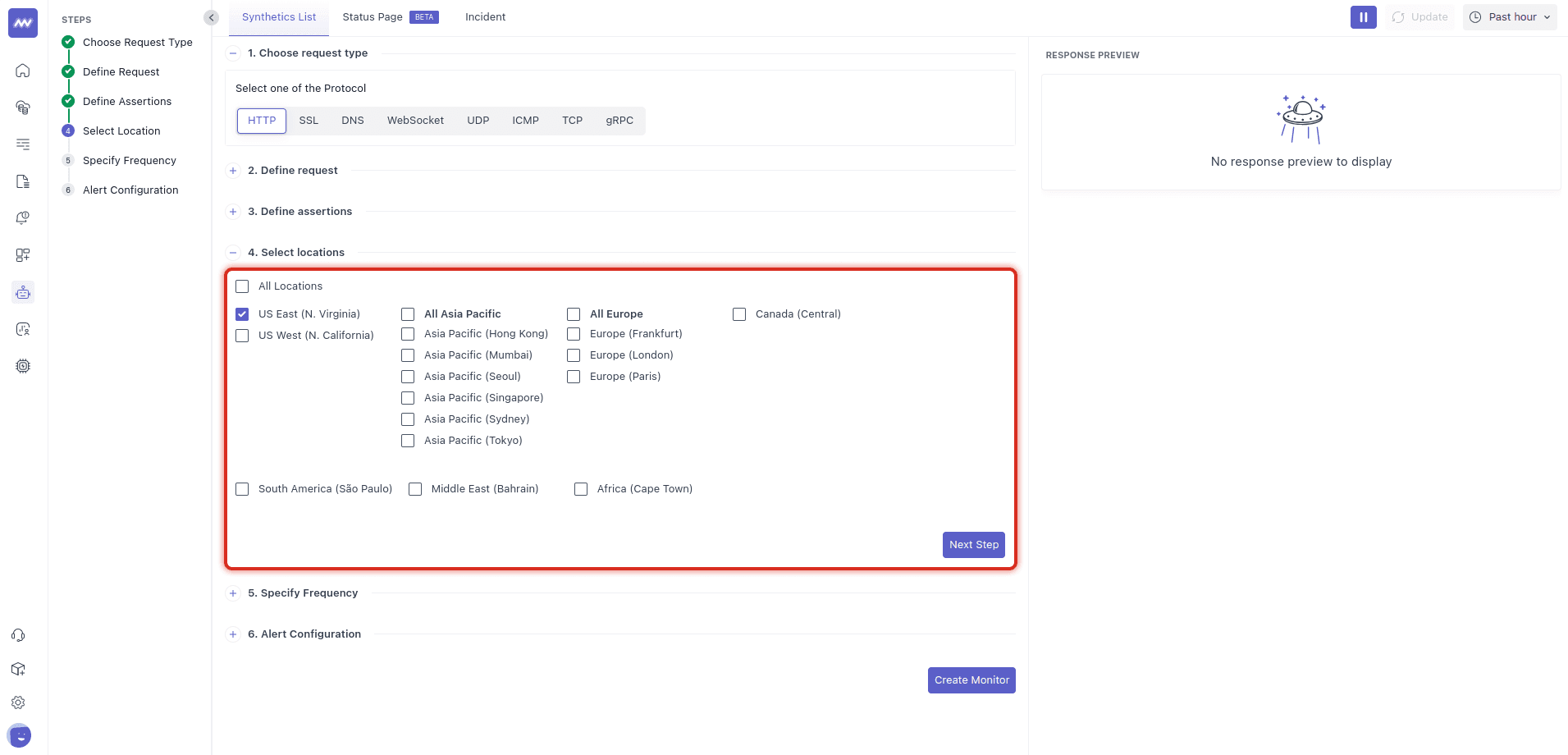
Select one or more locations from which Middleware should execute the test.
Running a test from multiple locations can help identify region-specific issues such as:
- CDN routing problems
- DNS differences
- Regional network latency
- WAF rules
- Region-specific endpoint availability
Start with one location while configuring the test, then add additional locations when broader coverage is required.
Allow Synthetic Agent Traffic#
If the monitored endpoint uses an IP allow-list, add Middleware's synthetic agent IP addresses so test requests can reach the service.
If a test fails only from a particular location, verify that your network configuration allows the synthetic agent IP for that location.
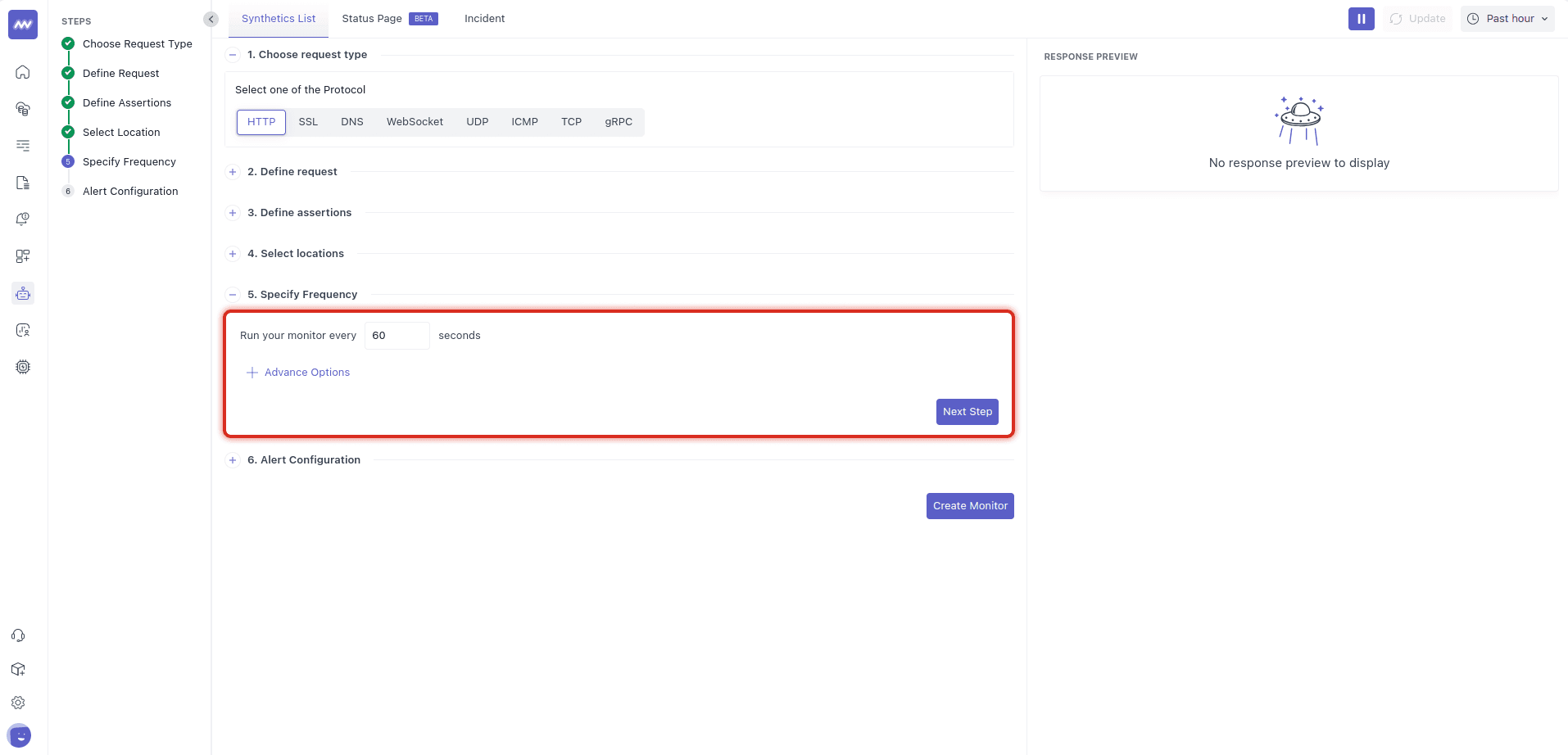
5 Set Test Frequency#
Configure how often the synthetic test should run.
Choose a frequency based on how quickly you need to detect a failure and how much synthetic traffic the endpoint can handle.
6 Configure Notifications#
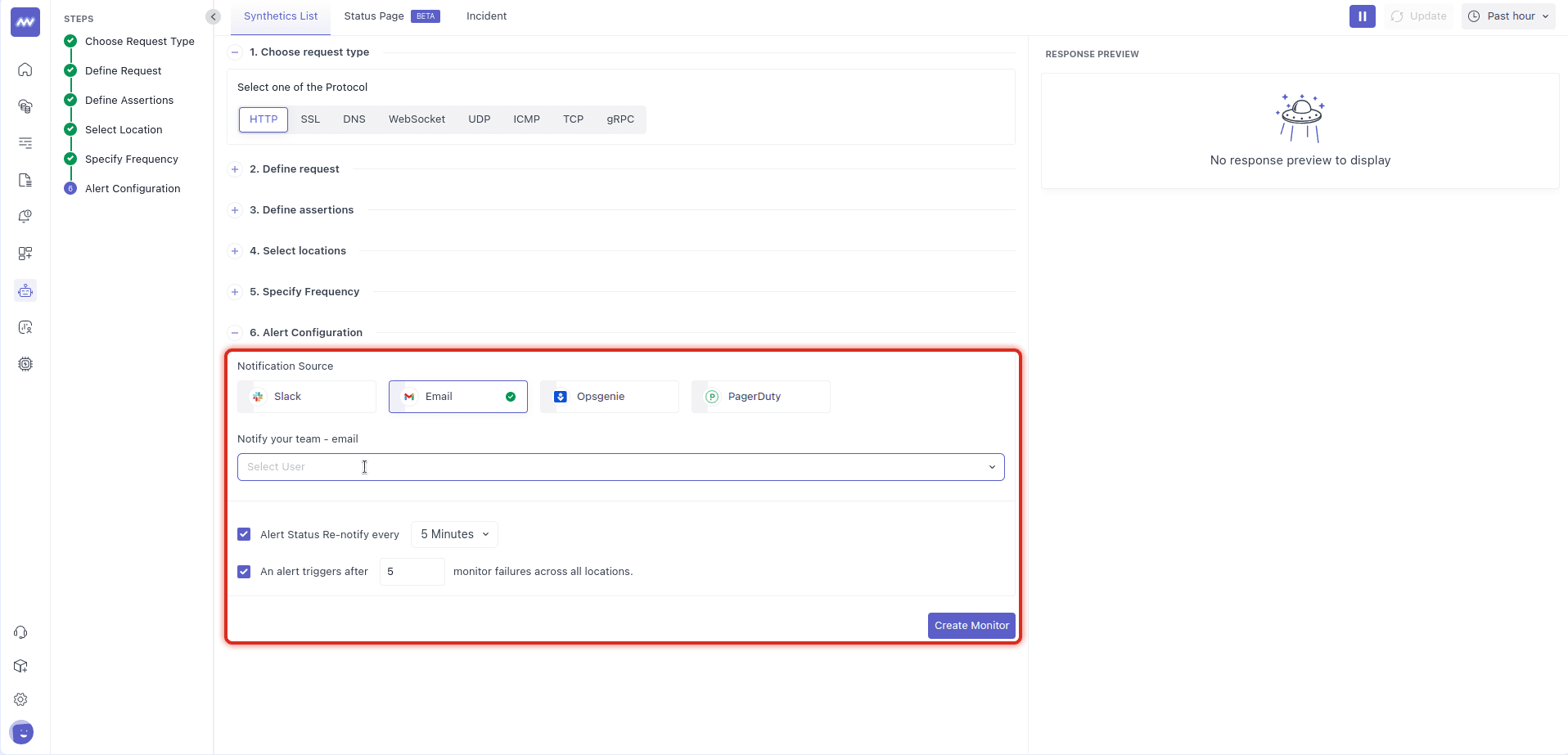
Configure where Middleware should send notifications when the synthetic test fails.
Supported notification channels can include: Slack, Email, Opsgenie, PagerDuty
You can also configure notification behavior such as:
- Re-notification interval.
- Number of monitor failures required before triggering a notification.
- Recipients or notification destinations.
Requiring multiple failures before notifying can help reduce alerts caused by isolated network failures.
After configuring the test, select Create Monitor.
Import Tests from cURL or Postman#
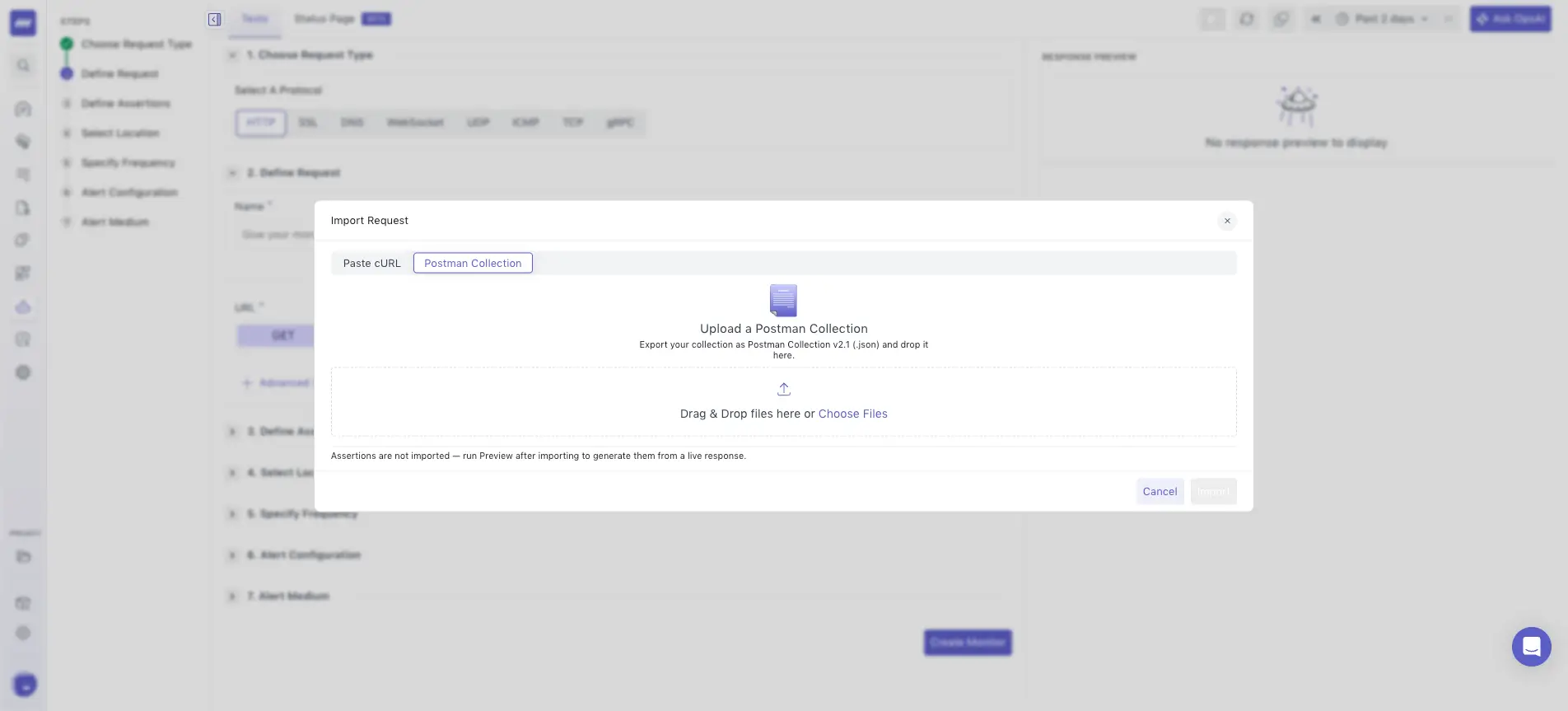
You can use existing API request definitions to create synthetic tests instead of configuring each request manually.
Middleware supports importing requests from:
- cURL
- Postman collections
Import the existing request or collection and use it as the starting point for your synthetic test configuration.
Review the imported request, assertions, locations, frequency, and notifications before creating the monitor.
View API Tests#
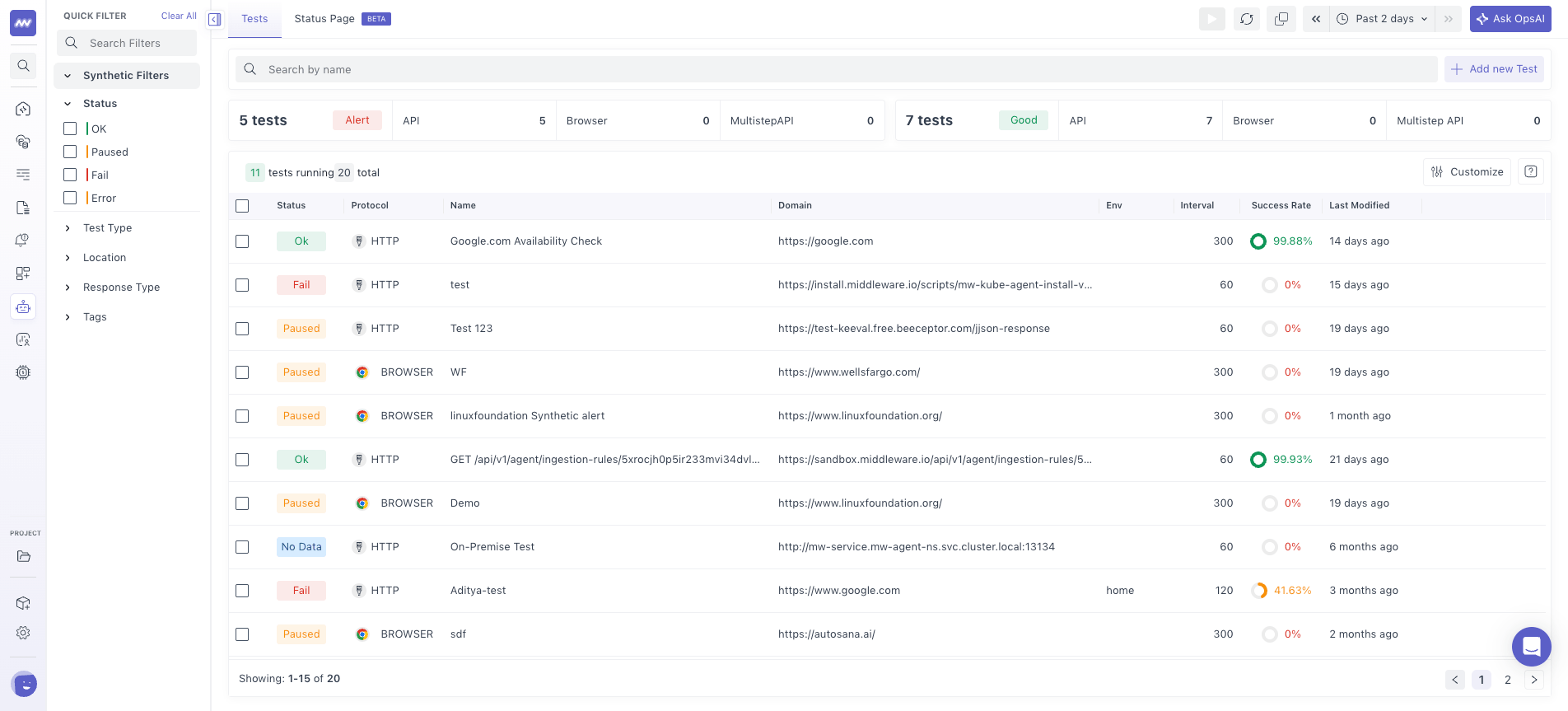
Go to: Synthetic Monitoring → Tests
The Tests page lists your configured synthetic API tests and their current monitoring status.
For each test, you can view information such as:
- API endpoint
- Status
- Protocol
- Test frequency
- Success rate
Use this view to identify failed or degraded tests and select a test for further investigation.
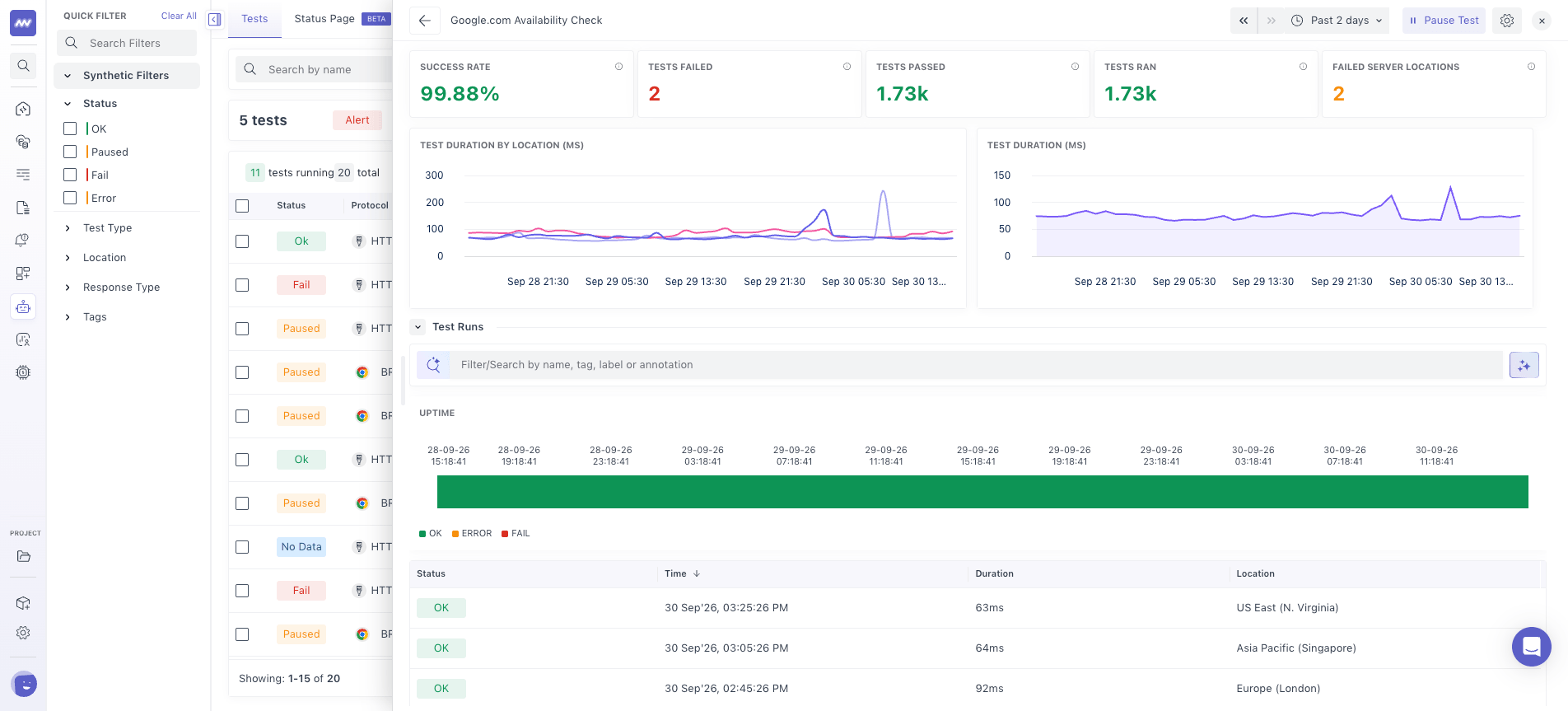
API Test Details#
Select a test from the list to open its details.
The test details provide information about the test configuration and its execution results over time.
You can review:
- Configured assertions
- Test configuration
- Test run results
- Test status over time
- Response information
Use the test history to determine whether a failure was isolated or occurred across multiple consecutive runs.
Test Run Details#
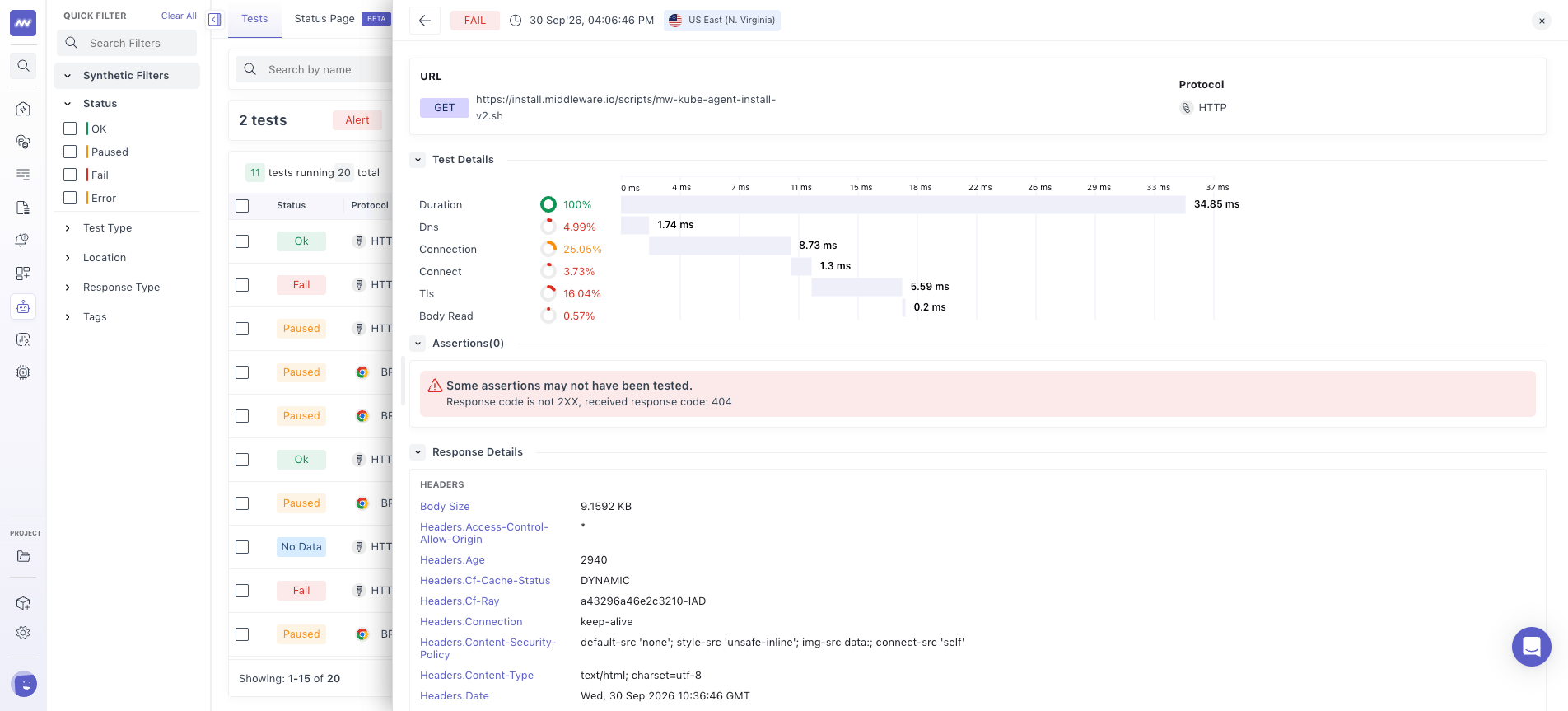
Select an individual test run to inspect how the request was executed.
The run details provide a timing breakdown of the request, including available stages such as:
- DNS resolution
- Connection
- Request/response processing
- Total duration
Each stage's duration helps identify where time was spent during the synthetic request.
For example, a slow DNS stage can indicate a DNS resolution issue, while increased connection time can point to network or connection establishment latency.
You can also inspect the response details for the selected test run to understand why an assertion passed or failed.
Troubleshooting#
Test fails only from one location#
Verify that your network allow-list contains the synthetic agent IP address for that location.
Also check for region-specific CDN, WAF, DNS, or network configuration.
Response is successful, but the test still fails#
Review all configured assertions.
For example, an endpoint may return HTTP 200 while failing a response-time assertion.
Response time varies between test runs#
Network latency can vary between locations and test runs.
Review multiple runs before adjusting the response-time threshold. If the configured threshold is too sensitive for expected network variation, update it to reflect the endpoint's expected performance.
Notifications are not received#
Verify that:
- A notification channel is selected.
- Recipients are configured.
- The configured failure threshold has been reached.
- Re-notification settings are not preventing another notification.
Need assistance or want to learn more about Middleware? Get in touch with us via our Contact Us or join our Slack channel.
What did you think of this content?