Middleware logoMiddleware logo
Get StartedFeaturesIntegrationsDeveloper ToolsCommunity

Getting Started

  • Get Started
    • Install an Agent
        • Kubernetes
        • Docker
        • Amazon ECS
        • Linux
        • Windows
        • MacOS
      • Otel Agent
        • AWS Lambda
        • Google Cloud Run
        • Azure Web App
        • AWS Elastic Beanstalk
        • Forge
        • Heroku
      • Third party agent
        • Datadog
        • Elastic logstash
      • Custom logs
      • Custom metrics
    • APM
      • Java
      • Go
      • Python
      • Node.js
      • Nest.js
      • Next.js
      • .NET
      • PHP
      • Ruby
      • Cloudflare
      • Deno
      • Scala
    • RUM Client SDKs
        • NextJS
        • JavaScript
        • Angular
      • Android
      • iOS
      • React Native
      • Flutter

Integrations

    • Overview
      • Slack
      • Jira
      • Microsoft Teams
      • Opsgenie
      • PagerDuty
      • Zenduty
      • GitHub
      • Bitbucket
      • GitHub
      • Bitbucket
      • Grafana
      • Datadog
      • Amazon Web Services
      • Azure
      • Google Cloud Platform
      • Vercel
      • Vercel
      • Journald
      • Vercel
    • Database
      • Cassandra
      • ClickHouse
      • Elasticsearch
      • MongoDB
      • MySQL
      • Oracle
      • PostgreSQL
      • AWS RDS PostgreSQL
      • Azure Database for PostgreSQL
      • GCP Cloud SQL for PostgreSQL
      • Redis
      • SAP HANA
      • SQL Server
      • MongoDB Atlas
      • Prometheus
      • Redpanda
      • Kafka
      • RabbitMQ
      • Apache
      • Nginx
      • Custom Logs
      • Custom Metrics
      • Okta
      • Microsoft Entra ID
      • Windows Event Logs

Features

  • Features
    • OpsAI
      • Configure OpsAI
      • OpsAI issue detection
      • Fix with OpsAI
      • Ask OpsAI
      • Alert investigation with OpsAI
      • Dashboard creation with OpsAI
      • Auto fix with OpsAI
      • Prompt Library
    • Infrastructure
      • Host
      • Process
      • Containers
      • Kubernetes
      • ECS
    • Application Performance (APM)
      • Configure application
      • Traces
      • Services
      • Continuous profiling
      • Endpoint monitoring
      • Database monitoring
    • Log Monitoring
      • Log Collection
      • Log Explorer
      • Log Patterns
      • Log Anomaly
    • RUM
      • Session Explorer
      • Product Analytics
      • Error Tracking
      • Heatmap
      • Performance monitoring
      • Correlate Data
    • Synthetic Monitoring
      • API test
      • Multistep API Testing
      • Browser tests
    • Status Page
      • Configure Status Page
      • Manage incidents
    • LLM Observability
        • Middleware SDK
        • TraceLoop
        • OpenLit
        • Trace LLM Application
        • Trace an Agent
        • Trace RAG pipeline
      • LLM monitoring
      • LLM evaluation
      • GPU monitoring
    • Dashboards
      • Dashboard builder
      • Notebooks
    • Alerts
      • Alerting
      • SLO
    • Pipeline
      • Overview
      • Configure Backend Data Control
      • Otel-native filters
      • Ingestion control
    • MCP Server
      • Overview
      • MCP server setup
      • MCP Tools
    • Account Management
      • User and Team settings
      • Roles & permissions
      • Project settings
      • Billing
      • Usage tracking
      • API Key
      • Audit log

On-prem

    • Setup
      • Prerequisite

Developer API Suite

    • API

Migration

    • Migrate from Datadog
    • Migrate from New Relic
  1. /
  2. Features/
  3. Pipeline

Pipeline

Control which telemetry is ingested and stored.

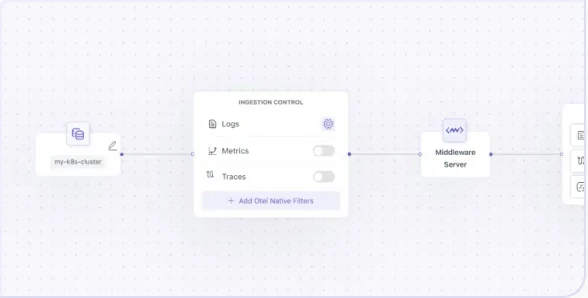
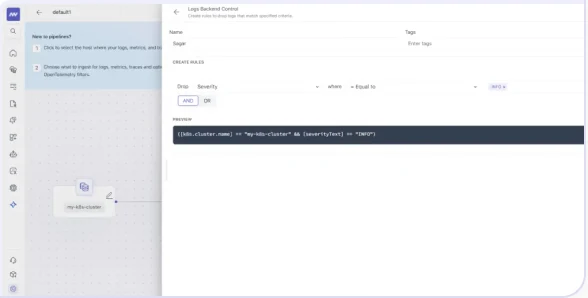
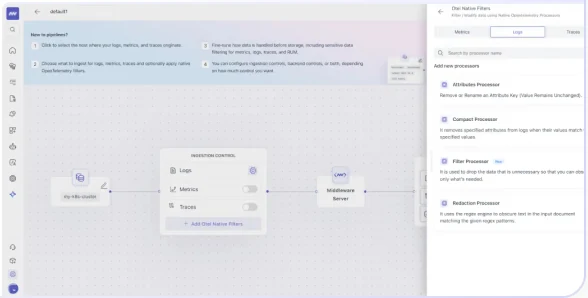
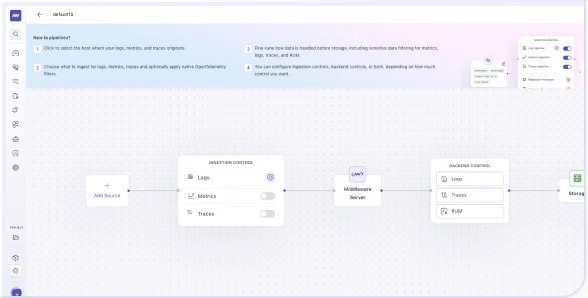
PipelineConfigure Middleware Agent Pipeline to manage data collection, processing, and delivery for seamless observability.Configure Backend Data ControlConfigure Middleware Agent Pipeline to manage data collection, processing, and delivery for seamless observability.Otel-native filtersConfigure Middleware Agent Pipeline to manage data collection, processing, and delivery for seamless observability.Ingestion controlExplore advanced admin settings in Middleware to customize monitoring, alerts, and system configurations for optimal performance.

What did you think of this content?

PreviousPipelineNextMiddleware Pipelines Overview

Ask AI about this page

Answers cite the Pipeline pages they came from.