Trace and evaluate a RAG pipeline
A retrieval-augmented generation (RAG) pipeline combines stages such as routing, document retrieval, and answer generation. Tracing each stage helps identify where an incorrect or slow response originated.
For example:
- Routing: The model decides not to retrieve context when retrieval is required.
- Retrieval: The vector store returns irrelevant or incomplete documents.
- Generation: The model ignores the retrieved context or generates an unsupported answer.
Evaluating only the final response makes it difficult to determine which stage caused the problem.
With LLM Observability, you can trace each stage as a separate span and evaluate it independently.
1User Query
2    ↓
3Routing
4    ↓
5Retrieval
6    ↓
7Generation
8    ↓
9Final Answer
How the RAG Trace Is Structured#
Create one parent span for the complete RAG pipeline and separate spans for each stage.
The result is one trace with the intermediate states visible:
1task: rag_pipeline
2  ├── llm_routing       (auto)
3  ├── rag_retrieval     (manual)
4  └── llm_generation    (auto)
Each span captures a different part of the workflow:
| Stage | Instrumentation | Input | Output |
|---|---|---|---|
| RAG Pipeline | @task | User query | Final response |
| Routing | Automatic | User query | Routing/tool-call decision |
| Retrieval | @retriever | User query | Retrieved documents |
| Generation | Automatic | Query + context | Final answer |
With auto_instrument=True, model calls are traced automatically.
You only need to manually instrument operations that auto-instrumentation cannot capture, such as the vector-store retrieval.
Install Dependencies#
Install the Middleware SDK, OpenAI instrumentation, OpenAI client, and ChromaDB:
1pip install middleware-llmobs openinference-instrumentation-openai openai chromadbConfigure your Middleware endpoint, API key, and OPENAI_API_KEY using the same environment variables described in Trace an LLM Application End to End.
1. Initialize LLM Observability#
1from openai import OpenAI
2from middleware.llmobs import register, task, retriever, annotate_rag
3import chromadb
4
5providers = register(service_name="rag-example", auto_instrument=True)
6client = OpenAI()
7
8# Seed a tiny vector store so the example runs end to end.
9collection = chromadb.Client().get_or_create_collection("docs")
10collection.add(
11    documents=[
12        "Middleware traces organize spans into parent-child workflows.",
13        "Evaluations attach a score to a span: boolean, numeric, or categorical.",
14        "The retriever span records the query and the documents it returned.",
15    ],
16    ids=["doc1", "doc2", "doc3"],
17)
18
19RETRIEVE_TOOL = {
20    "type": "function",
21    "function": {
22        "name": "retrieve_context",
23        "description": "Search the knowledge base for relevant information.",
24        "parameters": {
25            "type": "object",
26            "properties": {"query": {"type": "string"}},
27            "required": ["query"],
28        },
29    },
30}
31
32def route_query(query: str):
33    """Decide whether this query needs a knowledge-base lookup (auto-instrumented LLM span)."""
34    completion = client.chat.completions.create(
35        model="gpt-4o-mini",
36        messages=[
37            {"role": "system", "content": "Call retrieve_context only if the query needs external knowledge."},
38            {"role": "user", "content": query},
39        ],
40        tools=[RETRIEVE_TOOL],
41    )
42    return completion.choices[0].message
43
44@retriever(name="rag_retrieval")
45def retrieve_context(query: str, top_k: int = 3) -> list[dict]:
46    """Retrieve documents and record them on the retrieval span."""
47    results = collection.query(query_texts=[query], n_results=top_k)
48    documents = [{"id": i, "text": d} for i, d in zip(results["ids"][0], results["documents"][0])]
49    annotate_rag(query=query, documents=documents)   # query + documents land on this span
50    return documents
51
52def generate_answer(query: str, context: list[dict]) -> str:
53    """Generate the answer from the retrieved context (auto-instrumented LLM span)."""
54    context_str = "\n".join(f"- {d['text']}" for d in context)
55    completion = client.chat.completions.create(
56        model="gpt-4o-mini",
57        messages=[
58            {"role": "system", "content": f"Answer using only this context:\n{context_str}"},
59            {"role": "user", "content": query},
60        ],
61    )
62    return completion.choices[0].message.content
63
64@task(name="rag_pipeline")   # root span; the calls below nest under it
65def rag_pipeline(query: str) -> str:
66    routing = route_query(query)
67    context = retrieve_context(query) if routing.tool_calls else []
68    return generate_answer(query, context)
69
70print(rag_pipeline("How does Middleware handle tracing?"))
71providers.tracer.force_flush()
View the RAG Trace#
Open LLM Traces and select the rag-example service.
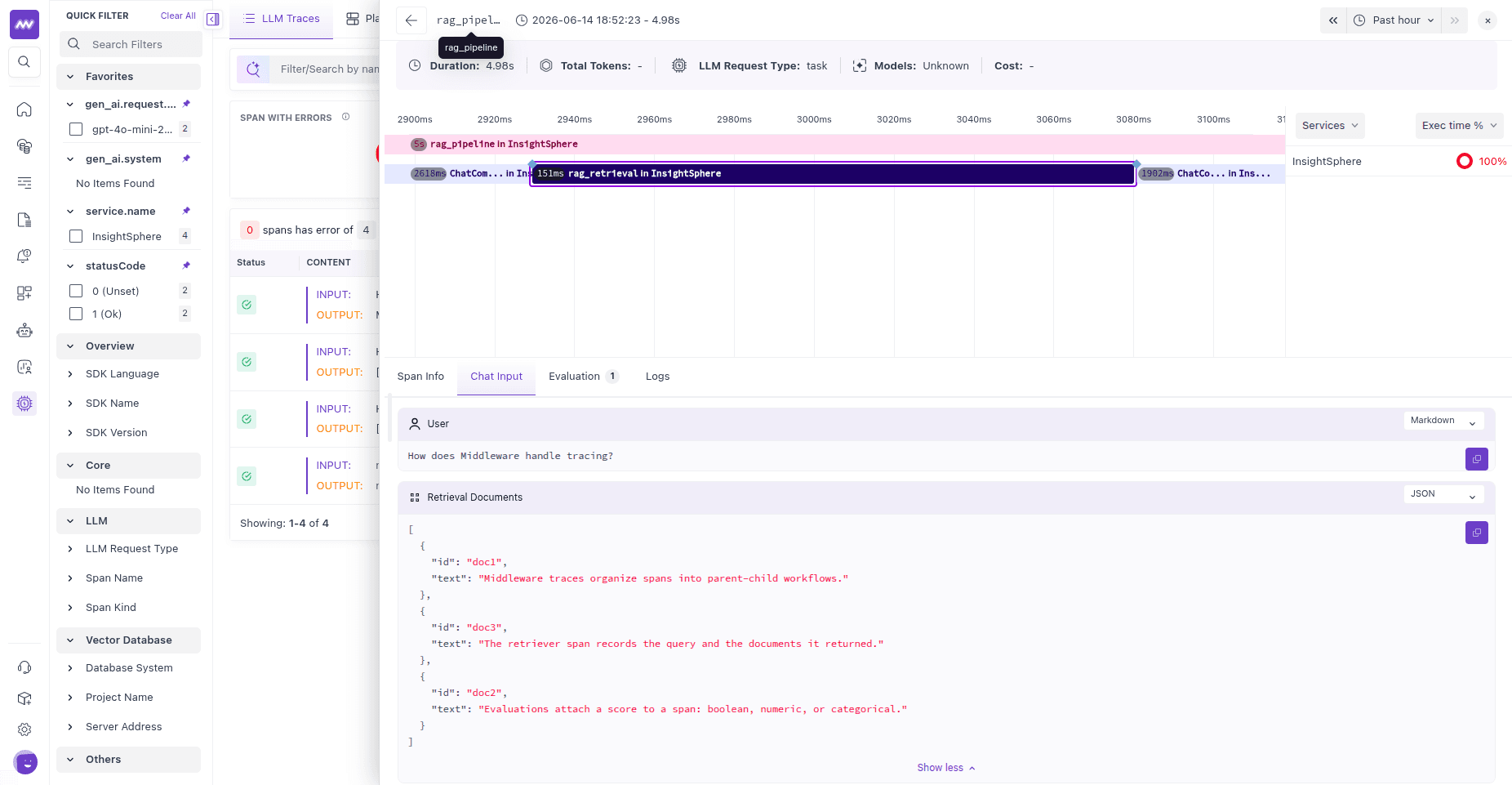
Each RAG request appears as a single trace containing the individual pipeline stages:
1rag_pipeline
2     │
3     ├── Routing LLM call
4     │
5     ├── rag_retrieval
6     │      ├── Query
7     │      └── Retrieved documents
8     │
9     └── Generation LLM call
10            ├── Query + context
11            └── Final answer
Open the retrieval span to inspect exactly which documents were available when the final answer was generated.
Retrieval context helps distinguish missing or irrelevant documents from a generation problem in which the model did not use the available information correctly.
Record Retrieved Documents#
annotate_rag() can record retrieved documents represented as plain dictionaries or objects exposing fields such as:
idscoretextorcontentnamemetadata
If the @retriever decorator does not fit your application structure, call:
1annotate_rag(
2    query=query,
3    documents=documents,
4)
inside your own active span.
Evaluate Each RAG Stage#
Because routing, retrieval, and generation are represented as separate spans, you can evaluate each stage independently.
| Stage | What to Evaluate | What a Low Score Can Indicate |
|---|---|---|
| Routing | Did the model decide correctly whether retrieval was required? | Routing instructions or the tool schema may not clearly define when retrieval should occur. |
| Retrieval | Are the retrieved documents relevant and sufficient for the query? | Retrieval may be returning irrelevant or incomplete context. |
| Generation | Is the answer grounded in and consistent with the retrieved context? | The model may be ignoring the context or generating unsupported information. |
Two ways to run these checks in Middleware:
- Server-side (UI) — create an LLM-as-a-judge evaluator and scope it to specific spans using an Evaluate On filter (for example, gen_ai.operation.name = retrieval for the retrieval step). No code changes; Middleware scores matching spans automatically.
- Client-side (SDK) — score a step in code and submit the result with submit_evaluation, or run your own judge with LLMJudge. This is the right choice for groundedness checks that compare the answer against the exact documents you retrieved.
Need assistance or want to learn more about Middleware? Get in touch with us via our Contact Us or join our Slack channel.
What did you think of this content?